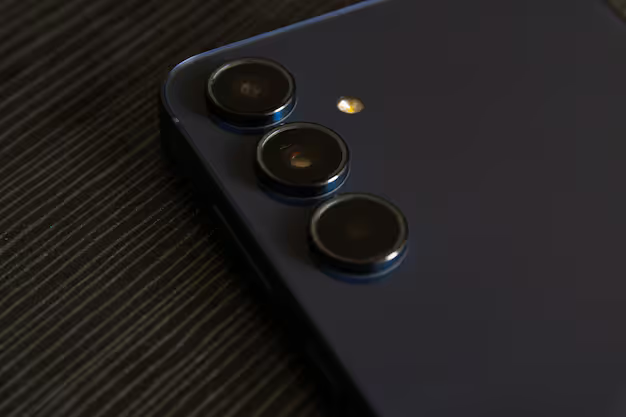
A mobile camera lens is a compact optical component built into or attached to a smartphone to capture images and videos. Over time, the phone camera lens has evolved into a sophisticated system capable of producing high-quality results once limited to professional cameras.
Light hits the sensor differently depending on the lens - be it a basic smartphone model or a high-end iPhone telescopic version. What you see sharpens or blurs based on that glass bending rays before they land. Zoom range shifts, not by magic, but by design etched into curves of the element. Even how close something feels ties back to this part guiding photons through space toward capture.
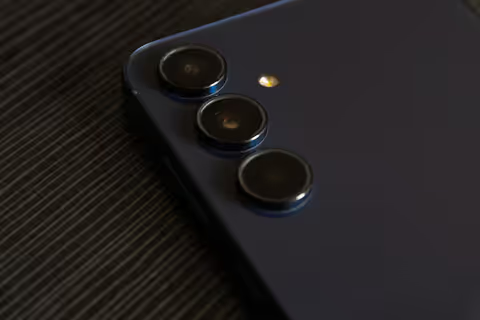
Mobile camera lenses focus light
Light enters a small window at the front, guided by miniature lenses made of glass or plastic. After passing through these pieces, it lands on a sensor waiting inside. That sensor takes the incoming glow and turns it into numbers. Numbers form what we see as a photo on screen.
Key working principles include:
- A tiny beam slips past the lens, then finds its way to the sensor. The glass guides what it catches, sending it straight where it needs to go. What arrives gets pinned in place by a quiet electric hush. A moment stays trapped just long enough to be remembered. Light does not shout here - it settles
- Aperture controls how much light passes through
- Image processing software enhances details and color
- Optical stabilization reduces blur from movement
Picture a smartphone camera with extra glass stuck on front. Tiny lenses team up, feeding data to smart software inside. Because of this teamwork, faces pop against blurry backgrounds. Dark scenes brighten without flash. Zoomed shots stay sharp far beyond old limits.
Mobile Camera Lenses Matter
A tiny glass circle on your phone now shapes how people share stories, capture moments, or record life. Not just snaps anymore - these lenses help artists work, journalists report, even scientists observe. What once stayed in pockets now opens doors.
Key reasons why these lenses are important:
- Enable high-quality photography without dedicated cameras
- Support video creation for social media and marketing
- Assist in scanning documents and QR codes
- Help in augmented reality applications
- Enhance remote communication through clear visuals
Out there, attachable lenses for phones open up new ways to shoot, slipping super close-ups or far-off scenes into your pocket. These extras slip onto iPhones and similar gadgets, quietly boosting what you can capture. Zooming in on distant action or catching tiny textures becomes part of everyday shooting. Some snap right on, others need a frame - each changes how light and distance play together. With one added, a phone camera sees differently - not just wider, but deeper.
Mobile Camera Lens Types
One reason phones pack several lenses? They handle separate jobs. A wide shot needs something else entirely compared to zooming in close. Every camera on your device does its own thing.
Common Types
- A broad view comes easily with this kind of lens. Scenes stretch further across the frame, especially when shooting open spaces. Groups fit neatly without crowding. Distance fades into background more smoothly here. What fills the edges stays sharp, even at the corners
- Ultra-wide lens: Expands the frame further for dramatic perspectives
- Telephoto lens: Provides optical zoom for distant subjects
- A tiny world fills the frame when using a macro lens. Getting near brings out hidden textures and shapes. Close-up clarity reveals what eyes normally miss. Tiny subjects appear large through this glass. Details sharpen only at small distances. The lens works best when nearly touching its target
- A tiny window for sensing depth: makes backgrounds look soft by measuring distance differently each time it captures a scene. This piece changes how close things appear without needing extra steps later on
- A glass block inside bends light sideways before it hits the camera. This trick lets you pull distant things closer while keeping your phone slim. Light zigzags through a small tunnel instead of traveling straight. The shape folds the path like a paper fan closing up. Zoom happens without stretching the body of the gadget
Some outside tools, such as clip-on lenses for iPhones, give similar results on phones that lack advanced camera features inside.
Mobile Camera Lens Features
Essential Features
- Optical zoom capability for clear magnification
- Image stabilization for sharp images
- Multi-lens systems for versatility
- High aperture values for low-light performance
- AI-based image processing
- Durable lens coatings to reduce glare and scratches
Together, these elements boost how well a phone's camera lens performs, fitting everyday snaps along with more demanding shots.
Lens Types Compared
A wide angle lens works well for everyday photos because it shows a balanced view. Yet zooming far is not possible with it. Landscape scenes gain when using an ultra wide setup since more of the environment fits into frame. Still edges might bend slightly in result. When photographing far away things, telephoto helps by bringing them visually closer through optical reach. But shaky hands affect outcome unless support exists. Seeing tiny details becomes easier under macro optics due to extreme close focusing ability. Only a small slice stays sharp at any time though. For long range magnification without adding size, periscope type delivers extended power within slim housing. This comes at cost of internal complexity behind glass.
Real-World Use Cases
Lenses on mobile cameras show up just about everywhere people work and play. They fit into daily tasks plus professional needs without standing out too much. Everyday use blends with specialized fields in quiet ways. Their presence grows where you might not expect - inside routines, outside offices, even in remote spots. Simple tools turn useful beyond what they first seem.
Practical Applications
- Social media content creation
- Pictures of places people visit, along with moving images captured during trips, form a record of experiences across different locations
- Online education and remote learning
- E-commerce product imaging
- Journalism and real-time reporting
Some photographers attach extra glass to their phone, using the device's own camera at the same time for better shots. While one part captures detail, the add-on widens what you can see. Together they give more control over how things look. Instead of just relying on software tricks, this setup changes how light enters. Each piece plays a role - sharper results come from both working side by side.
Advanced Mobile Lenses Solve Problems
Modern mobile phone camera lens systems address several common photography challenges:
- Low-light performance through larger apertures and AI enhancement
- Motion blur reduction with stabilization technologies
- Lens reaches far, yet still capped in range. Telephoto stretches out but stops short eventually. Periscope adds reach, though boundaries remain firm. Zoom pushes close - just not all the way. Distance narrows slightly, never fully bridged
- Lack of detail in close shots with macro lenses
- Depth perception using multi-lens systems
Better outcomes now come easier, even when fancy tools aren’t around. Equipment aside, people see clearer progress thanks to these upgrades.
Recent Trends and Developments 2025 to 2026
A fresh wave of changes hit phone camera lenses lately. New ideas spread fast across makers last twelve months. Some improvements surprised even long-time watchers. Speedy upgrades arrived from unexpected spots worldwide. Progress jumped in ways few predicted a while back.
Key Developments
- AI-powered photography enhancements improved significantly in 2025
- Advanced periscope zoom systems expanded beyond 10x optical range
- Larger sensors paired with improved mobile phone lens camera designs
- Integration of computational photography for real-time image optimization
- These days, more people choose sapphire because it resists scratches well. That means screens last longer under rough handling. Light bounces off less when anti-reflective layers are added. So visibility improves in bright places. Together, they help devices stay clear and strong over time
Out of necessity, some builders mix physical parts with code tricks to squeeze out speed without bloating the shell. One result? Thinner boxes that still push hard when running tasks.
Regulations and Policies
Though phone cameras can usually shoot anything, some rules still matter
- Where rules apply, snapping photos without permission isn’t allowed. In certain places, privacy protections block image collection outright. Without approval, taking pictures can cross legal lines. Depending on location, silent agreement might still fail to justify recording faces. Laws step in when personal space meets a lens unexpectedly
- How data gets stored or shared depends on privacy rules. Yet those captured images still follow legal paths. Rules shape where footage lives. While handling video, laws guide every move. Even sharing clips answers to policy. Storage choices bend to regulation demands
- Some regions impose restrictions on photography in sensitive locations
When snapping photos in public, people must stick to local rules about phone lenses. Depending on where they are, laws might shape how someone uses that tool at work. Following guidelines keeps things smooth whether out walking or doing job tasks. Wherever the place, staying within legal lines matters for anyone aiming a lens around others.
Tools and learning resources
Useful Tools
- Built-in camera apps with manual controls
- Third-party photography apps for advanced editing
- Lens attachment kits for smartphones
- Tripods and stabilizers for better shots
Learning Resources
- Online photography tutorials
- Mobile photography courses
- Community forums and content platforms
- Manufacturer guides for device-specific features
With these tools, snapping sharper shots becomes easier. A better lens means clearer photos on your device. Some apps guide framing through real time hints. Others adjust light balance when it gets tricky. Each option opens new ways to capture moments. Picking the right one changes how you see everyday scenes. Details stand out more with small tweaks made possible here.
FAQs
What is a mobile camera lens used for?
Lens on a phone grabs pictures and video by guiding light to the device's sensor. Quality of what you see, how close things look, sharpness - all shaped by this small part. What it does changes everything from detail to distance.
How does an iphone telescope lens work?
A tiny mirror bends light sideways inside your phone camera, letting it stretch the view farther. This trick hides extra magnification behind thin glass. Light bounces once or twice before hitting the sensor. Instead of stacking lenses outward, they fold the path like origami. Zoom gets stronger while the back stays flat. Your pocket feels nothing different.
Can external phone lenses for iphone improve quality?
Lenses added outside might boost zoom or close-up shots, yet how well things turn out ties back to what the phone's camera hardware and software can handle. Still, better glass won’t fix weak internals - performance lives within the device itself.
What is the difference between optical and digital zoom?
Lenses stretch out their glass parts to pull things closer, keeping everything sharp. When that does not happen, pixels get stretched instead - making the picture softer. Light bends through motion, but math just guesses what should be there.
Why do smartphones have multiple lenses?
From wide views to tight details, phone cameras switch gears smoothly thanks to varied lens setups. Zooming in, stepping back, or focusing near - each task finds its match through distinct optics working separately yet together behind the scenes.
Conclusion
Inside today’s phones, the little camera lens does heavy lifting, turning slim devices into serious photo machines. Not just for snaps anymore, they handle complex shots while staying pocket small. Because tech keeps pushing forward - better glass meets sharper software - the next wave of phone cameras will see clearer detail, reach farther when zooming, pull light from shadows, and adjust on their own in clever ways.
One way to get more from your gadget is knowing how its camera lens works. Not just what kinds exist, but how each behaves in real situations. A phone’s original lens does plenty, yet trying extra lenses can shift what you capture. Different shapes, sizes, or attachments open paths you might not expect. Even small changes bring new results when taking pictures. Tools evolve fast, so options grow without needing a full upgrade.