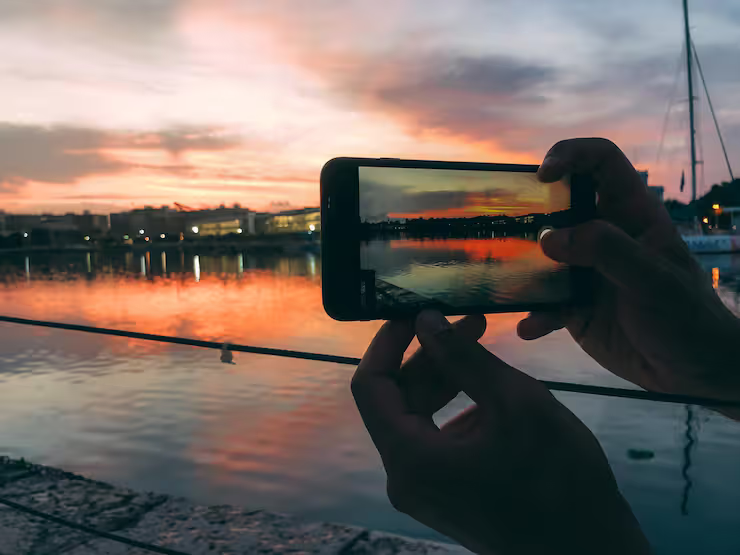
Low light mobile photography focuses on capturing clear and detailed images in dim or nighttime conditions using a smartphone. It addresses common challenges like noise, blur, and poor exposure that occur when light is limited. With advancements in smartphone cameras, even a low light camera mobile can produce impressive results when used correctly.
Most of life happens when the lights dim - night outings, gigs, quiet corners indoors, streets after dark. Phones that handle shadowy settings well turn those fleeting instances into photos worth keeping. Instead of lugging around heavy gear, someone might just pull out their pocket device and snap what matters. The right mobile camera makes it possible.
Low Light Mobile Photography Explained
Most of the time, tiny parts inside your phone's camera work together to grab pictures using light. When it gets dark, those pieces must pull in extra brightness so you can actually see what’s there.
Key working principles include:
- Brighter scenes come through clearer when the sensor is bigger. Less grain shows up because extra light gets soaked in like a sponge. Picture quality steps up without asking for permission
- Brighter shots come easier when the lens opens wide. A larger opening pulls in extra light, just like phones with top-end lenses do. Light floods in faster where the gap between glass pieces widens. Some cameras let the circle inside stretch further. More glow reaches the sensor when space allows. Opening up means less struggle in dim scenes
- Image processing algorithms enhance brightness and reduce grain
- Darkness fades when layers of light stack up. One sharp picture comes from several tries. Each piece adds brightness where it's needed most
Some newer phones advertised for great night shots rely on smart software that tweaks images without asking. A hidden tech layer adjusts details when lighting gets tough.
importance and real world use cases
Low light photography on mobile devices is widely used in everyday situations:
- Night travel photography in cities or tourist locations
- Indoor photography at events or gatherings
- Social media content creation in dim environments
- Emergency documentation in low visibility conditions
When light is dim, a top-performing phone camera captures sharper images - particularly useful while shooting quick motion or complex visuals. A solid device handles shadows better, pulling out detail where others blur or fade. With faster sensors and smarter processing, it turns tough conditions into clear results. Low-light performance means less grain, more definition, even in dark corners of the frame. Scenes at dusk or indoors gain balance and depth without extra lighting. Speed matters too; split-second moments stay crisp instead of smearing across the shot.
Low Light Photo Enhancements
Camera Hardware
- Large sensor size for better light capture
- Wide aperture lenses (f/1.8, f/1.6, or lower)
- Optical Image Stabilization (OIS)
Light finds its way easier into a camera when the lens opens wide, thanks to a low aperture number. This natural boost cuts down how much editing is needed later. Brightness gains come without relying on software tricks.
Software Enhancements
- Night mode processing
- HDR (High Dynamic Range)
- AI scene detection
- Multi-lens setups for flexibility
- Ultra-wide and telephoto support
Image Stabilization
- Reduces blur caused by hand movement
- Fingers steady. Crucial when light fades. Shaky hands blur the frame. Stillness matters most after dark
Low Light Photography Mode Types
Night Mode
- One frame follows another, then they blend together
- Enhances brightness without overexposure
- Sliding into full command means adjusting light sensitivity by hand. Shutter timing shifts at your touch instead of automatic choices. Focus locks right where you decide, no guessing involved
- Ideal for experienced users
HDR Mode
- Balances highlights and shadows
- Useful for mixed lighting conditions
- Uses AI to enhance subject and background separation
- Often combined with flash or screen lighting
common challenges and solutions
Low light photography comes with technical limitations:
- Noise or grain in images
- Some movement shows up because the camera stays open too long
- Loss of detail in shadows
Solutions include:
- Keeping the phone steady or using a tripod
- Using night mode instead of flash
- Adjusting ISO and shutter speed manually
- Avoiding digital zoom in low light
Most top phones still have trouble capturing dark scenes well unless you know how to shoot.
Recent Trends and Developments 2025–2026
Recent advancements in smartphone photography have significantly improved low light performance:
- 2025: AI-based night photography improved with real-time processing
- 2025: Larger sensors introduced in flagship smartphones
- 2026: Enhanced computational photography using multi-frame stacking
- 2026: Integration of RAW night mode for professional editing
Few years back, that kind of performance would’ve seemed impossible from a handheld device. Now, under dim streetlights or during evening gatherings, some phones capture detail almost like bulkier cameras do. Processing power helps, but lens design matters just as much. In quiet scenes with steady hands, results surprise even cautious photographers. Light gathering has improved so much it narrows the gap without closing it fully. Entry level DSLRs still hold advantages when movement is involved. Yet for casual moments after sunset, the edge blurs more each season.
Rules and Right Choices
Though no specific rules cover dim-light phone photos, a few basic tips still matter
- Respect privacy when capturing photos in public or private spaces
- Follow local regulations regarding photography in restricted areas
- Avoid using flash in sensitive environments (e.g., wildlife or museums)
Using a phone for low light photos means staying within right choices and rules. A person should think about what is fair while taking shots when it's dark. Light levels change how clear images turn out, yet behavior matters just as much. Choices made during nighttime capture reflect both awareness and respect. Handling such situations well keeps things lawful and thoughtful at once.
Tools and resources for learning
Mobile Apps
- Adobe Lightroom Mobile for editing RAW images
- Snapseed for quick adjustments
- ProCam for manual camera control
Learning Platforms
- Online photography courses on platforms like Coursera
- YouTube tutorials for night photography techniques
- Photography blogs and forums
Accessories
- Tripods for stability
- External lenses for creative shots
- Portable lighting for controlled environments
Using these tools can really boost how well your phone's camera works in dim lighting.
Simple Ways to Improve Outcomes
Shooting Techniques
- Hold the phone steady or use support
- Tap to focus on the subject
- Avoid sudden movements
Lighting Adjustments
- Use available light sources like streetlights
- Avoid overusing flash
- Slide the brightness slider by hand when it helps. Sometimes fingers work better than automatic settings
Camera Settings
- Lower ISO to reduce noise
- Increase shutter speed carefully
- Use RAW format when possible
Though top phones snap sharp shots when dim, how you shoot matters just as much.
FAQs
What makes a smartphone good for low light photography?
Picture quality in dim settings often improves when the phone uses a bigger sensor. One key part? A lens that lets in more light thanks to its wide opening. Software also plays a role - modes designed for darkness adjust on the fly. These tools work behind the scenes to brighten scenes without blurring motion.
A smaller f-number means more light hits the sensor when it is dark outside?
A smaller number on the aperture means it pulls in more light, so dim settings work better. This kind of opening brightens scenes when surroundings are dark.
Most phones today can take dark pictures better, though not every model handles low light the same way?
Some newer phones come with night mode built right in. Yet how well it works really hinges on what kind of camera parts are inside plus the code that runs them.
Can I take clear photos without using flash?
Most phones handle dim scenes well when you skip the flash. Night mode helps sharpen details in darkness. Some models work better than others after sunset. Adjusting settings by hand often beats automatic choices. A top-rated device in low light usually delivers cleaner results.
Why do low light photos look grainy?
Light too dim? The camera boosts ISO, which brings out grain. Brighter lights help, or holding steady works too. Sometimes a still hand keeps things clean.
Conclusion
Darkness no longer stops phone cameras from taking clear pictures. Thanks to wider lens openings, bigger image sensors, smaller details now show up better at night. Smart algorithms adjust shadows and brightness on their own, improving results without extra effort. Even dim scenes can produce sharp photos because of these upgrades inside modern devices.
Start by realizing that dim conditions don’t have to ruin your shots. A device built for gathering more light tends to perform better when darkness falls. Instead of relying on automatic defaults, adjusting controls yourself often brings out hidden clarity. Some phones let you tweak exposure time, which changes how bright the image looks. Even without pro gear, thoughtful timing and steady handling make a visible difference. Light behaves differently at night - working with it beats fighting against it.
Faster chips inside phones now manage dark scenes better, so snapping pictures without much light feels easier these days. Though dim settings once challenged cameras, today's devices adjust on their own, pulling out clearer shots where older models failed. Even nighttime snapshots show richer detail, thanks to smarter software working behind the viewfinder.




